AI-powered hospitality stocktaking, variance & GP

Find missing stock and complete your stocktake in a fraction of the time.

Count faster. Connect your data. Protect your margin. StockLens AI connects stocktakes, supplier invoices, sales, recipes and waste to give hospitality operators a clearer view of what they have, what they should have and where margin may be being lost.

  • Cut stocktake admin
  • Spot variance faster
  • Improve GP visibility
  • No specialist hardware
stocklensai.co.uk / stocktakes / back-bar
Bar shelf scanned by the StockLens AI live scanner
Absolut Vodka 70cl · 95%
Smirnoff Red 70cl · 42%
Tanqueray Gin 70cl · 91%
Gordon's Gin 70cl · 80%
Jack Daniel's 70cl · 65%
Bombay Sapphire 70cl · 24%
Havana Club 3yr 70cl · 58%
Bacardí Carta Blanca · 73%
Products registering
8
Live scan · review before approve
Ready to review
Approve, edit or correct
Average fill
63%
Stock value
£12,840
Total inventory value
Variance
−3.2%
vs expected usage
GP this week
71.4%
Across all products

Scan stock, photograph invoices and sales reports, and let AI handle the data entry.

The platform

More than AI scanning. Complete hospitality stock control.

StockLens starts with fast stock capture, then lets you photograph or upload supplier invoices and sales reports so AI can extract the details. Your stock counts, purchases, sales, recipes and variance live in one platform — with no retyping of paperwork.

  • Scan shelves using your phone
  • Photograph or upload supplier invoices
  • Photograph or upload sales reports
  • Let AI extract the details for you
  • Build recipes and cocktail specs
  • Track waste, breakage and staff drinks
  • Identify product-level variance
  • Monitor GP and profitability
How it works

From shelf to variance report — without the retyping.

Scan stock with your phone, photograph or upload invoices and sales reports, and let AI extract the details. Review, approve and see the variance affecting your GP.

01

Scan your stock

Use your phone to scan bottles, shelves and stock areas without specialist hardware.

02

Review the detections

Check recognised products, quantities and fill levels before confirming the count.

03

Photograph your invoices and sales reports

Take a photo or upload the file. StockLens AI extracts the supplier, product, pricing and sales information for you.

04

Review the extracted information

Check the information StockLens has identified and make any necessary corrections before approval.

05

Compare expected and actual stock

Bring stock counts, purchases, sales and recipes together to identify unexplained variance.

06

Investigate what is affecting GP

See which products, categories and stock areas may require attention.

Snap it. Upload it. Let AI do the data entry.

Stock control without the data-entry headache.

StockLens AI is designed for busy hospitality teams. Instead of manually typing information from supplier invoices and sales reports, take a photo or upload the document and let AI extract the details.

Photograph an invoice

Take a clear photo of a supplier invoice or upload the original document.

AI extracts the details

StockLens identifies information such as products, quantities, case sizes, purchase prices, invoice numbers and totals.

Review and confirm

Check the extracted information, make any necessary edits and approve it before it affects your stock records.

Sales reports too. Upload or photograph a sales report and StockLens extracts the information needed to support expected-usage and variance reporting. Extracted information can always be reviewed and corrected before approval.
Features

Every feature, in every plan.

Whichever plan you pick, you get the full StockLens platform — no feature gates.

Live AI Shelf Scanning

Scan shelves with your phone camera and review detected products before approval.

Manual Stock Entry

Add products from your library when AI scanning is not suitable.

Product Library

Maintain products, costs, suppliers, sizes and categories in one place.

AI Invoice Capture

Photograph or upload supplier invoices — StockLens extracts products, quantities, case sizes, prices and totals for review.

AI Sales-Report Capture

Photograph or upload an EPOS report, PDF, screenshot or supported file — StockLens extracts the sales information for review and variance.

Recipe-Based Variance

Create cocktails and serves using product measurements to calculate theoretical usage.

Waste & Breakage Logs

Track broken bottles, spillages, staff drinks, comps and promotions.

Variance Reporting

Compare expected stock against actual stock to identify losses and discrepancies.

GP Reporting

Monitor product and recipe profitability across venues.

Multi-Venue Management

Manage one site or a group of hospitality venues from a single account.

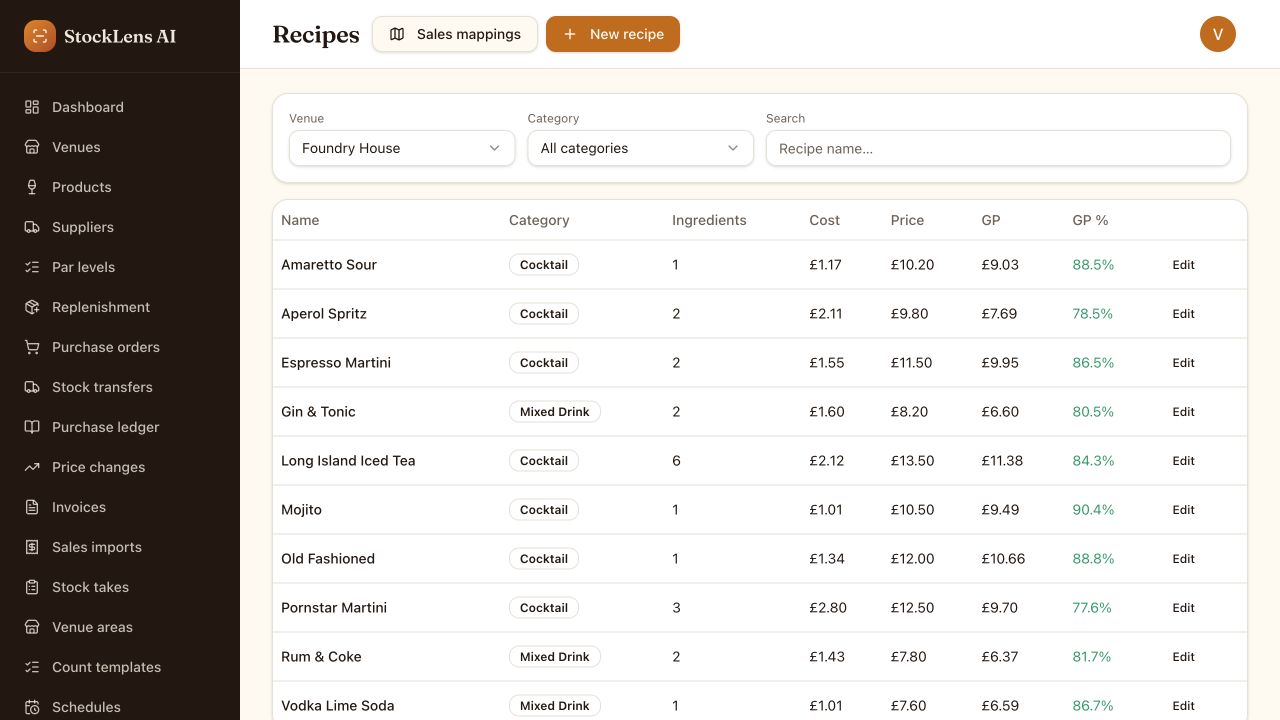
Recipe-based variance

Turn cocktail sales into accurate stock usage.

Create recipes for cocktails, mixed drinks and serves using products from your library. When sales reports are imported, StockLens calculates theoretical usage and compares it against actual stock.

recipes / pornstar-martini
Recipe
Pornstar Martini
Example
Vanilla Vodka50ml
Passoa25ml
Lime15ml
Passionfruit purée50ml
Sold
100
Expected vodka
5L
Variance
Flagged

Example only — variance is calculated once your own sales and stock information has been captured.

Why StockLens

Built to protect time, stock and gross profit.

Less manual data entry

Photograph or upload invoices and sales reports instead of manually typing products, quantities, prices and totals.

Faster setup

Use existing documents to help build your product, purchasing and sales information without starting everything from scratch.

Clearer variance

Compare actual stock against recorded sales, purchases and recipes to identify unexplained differences.

Better GP control

See which products and categories may be contributing to stock loss, overpouring, waste or recording errors.

A better way

A better way to manage hospitality stock.

Traditional stocktaking
  • Manual bottle counts
  • Paper sheets and spreadsheets
  • Delayed reporting
  • Limited visibility between stocktakes
  • Difficult to compare sites consistently
  • Heavy reliance on manual data entry
StockLens AI
  • Phone-based stock scanning
  • Centralised digital records
  • Faster access to variance information
  • Reviewable AI-assisted detections
  • Consistent processes across venues
  • Sales, invoice and recipe data in one platform

StockLens is designed to assist stocktaking — your team still reviews and approves the final count.

AI-assisted, manager-approved

AI does the heavy lifting. You stay in control.

StockLens uses AI to help recognise products, quantities and bottle fill levels. Every detection can be reviewed, edited or removed before a stocktake is approved, so your team remains in control of the final count.

Review before approval

Nothing is finalised until a manager confirms the count.

Edit products, quantities and fill levels

Adjust anything the scanner has interpreted differently to your team.

Add anything the scanner has missed

Search your library or create a new product straight from the review screen.

StockLens is designed to assist stocktaking — not remove human oversight.
Getting started

From signup to your first stocktake.

01

Create your venue

Add your venue details, stock areas and team access.

02

Photograph or upload your files

Take a photo or upload an invoice, sales report, PDF or supported file. StockLens AI reads the document and extracts the relevant information, reducing manual data entry.

03

Let AI build your library

Products, suppliers, quantities, case sizes and prices are extracted from your documents for review before they update your records.

04

Run your first stocktake

Scan, review and approve your count before viewing variance and GP results.

No new hardware is required. StockLens works through a supported smartphone, tablet or browser.

Compatibility

Designed to work with your existing operation.

Supplier invoices

Photograph or upload supplier invoices. StockLens AI extracts product, quantity, case-size, pricing and invoice information for review.

Sales reports

Photograph or upload an EPOS report, PDF, screenshot or supported file. StockLens AI extracts the relevant sales information for review and variance calculations.

Recipes

Add product recipes to support expected-usage and variance calculations.

Multiple stock areas

Separate areas such as the cellar, back bar, spirit store and external storage while keeping one complete stocktake.

CSV upload remains available where required, but you should not need to prepare a spreadsheet when a readable sales report can be photographed or uploaded. Where a direct integration is not available, StockLens works from files rather than a live API connection.

Try it in your venue

Test StockLens in your own venue.

Start a 14-day trial and see how StockLens fits into your existing stocktaking process.

You will not be charged until the trial ends. Cancel before the end of the trial to avoid payment.

  • Photograph or upload a supplier invoice
  • Let AI extract the products, quantities and pricing
  • Upload or photograph a sales report
  • Review extracted information before approval
  • Run a real stocktake
  • Compare expected and actual usage
Our story

Built from real hospitality experience.

StockLens AI was created by hospitality operator Jack Hardy after years of managing stock, gross profit and operational controls across a portfolio of venues. The platform is being built to solve the practical stocktaking problems hospitality teams face every week.

StockLens is designed around real venue workflows — not generic inventory management.

Before you switch

Questions hospitality operators ask before switching.

Programmes

Grow with StockLens.

Refer a Venue

Customers can refer venues and earn account credit when referred businesses become paying customers.

View Referral Programme

Become a Partner

Hospitality consultants, accountants, EPOS resellers and stocktakers can apply to become StockLens partners.

Become a Partner
FAQ

Everything you need to know about StockLens AI.

Frequently asked questions

Test StockLens in your own venue.

Start a 14-day trial and see how StockLens fits into your existing stocktaking process. You will not be charged until the trial ends — cancel before the end of the trial to avoid payment.

Works on any smartphone Onboarding support GDPR compliant Multi-user access Built in the UK